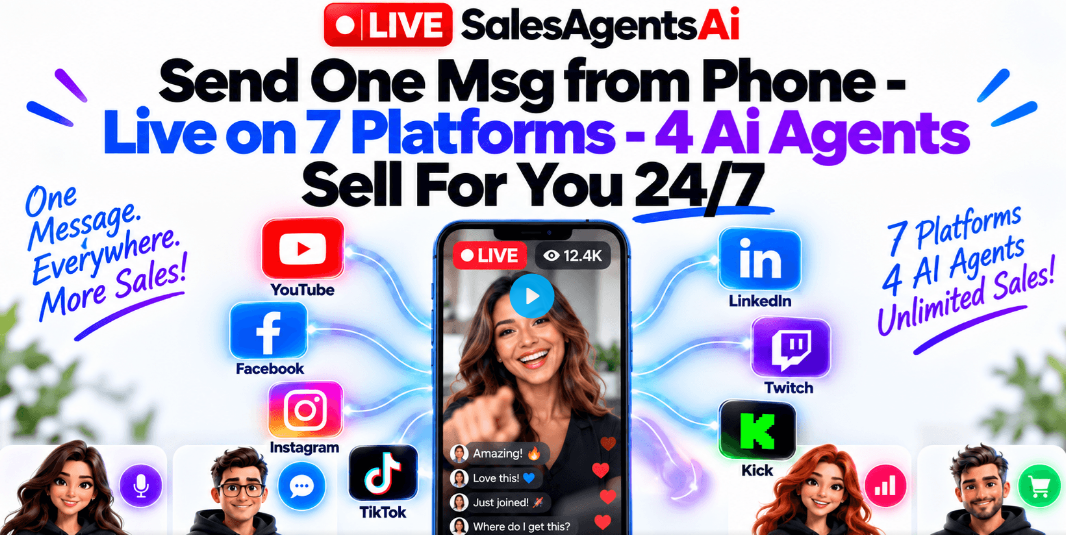
LiveStreamSalesAgentsAI is a browser-based live-streaming and sales-automation platform, built by FlowCasta and created by Jai Sharma. It takes a video you already own — a product demo, an old webinar, a VSL, or one of its 100+ built-in templates — and streams it as a “live” sales event across up to seven platforms at once: YouTube, Facebook, Instagram, TikTok, LinkedIn, Twitch, and Kick.
While that event runs, four AI agents manage the entire room in real time. One hosts the broadcast, one replies to comments, one keeps engagement high with polls, and one watches the conversation for buying signals and drops your offer, buy link, and QR code on screen at exactly the right moment.
The core idea is simple: most streaming tools help you broadcast. This one is built to also sell — handling the parts of live commerce that normally require a human being present for hours at a time.
How Does LiveStreamSalesAgentsAI Work?
➤ Step 1 — Pick What You’re Selling
Choose your own product, an affiliate offer, or a client’s offer. Anything with a checkout link is compatible.
➤ Step 2 — Upload A Video Or Choose A Template
Use a video you already have, or select from the built-in template library, including niche-specific and 24/7 night-stream formats.
➤ Step 3 — Train Your Agents Once
Paste in your product link, price, discount code, and answers to five or six common buyer questions. This becomes the knowledge base your agents use to respond accurately in the live chat.
➤ Step 4 — Send “START” And Go Live
Once setup is complete, the vendor states a single Telegram message launches the event across every connected platform, with the agents running the show from there.
The one-time setup is stated to take about 10 minutes. After that, every future event is designed to be as simple as sending one message from your phone.
4 AI Sales Agents Hosty runs the broadcast, Chatty answers every comment across every platform, Buzzy fires polls to keep engagement high, and Closer detects buying intent and surfaces your offer instantly. Multi-Platform Broadcasting Streams to up to 7 destinations simultaneously — YouTube, Facebook, Instagram, TikTok, LinkedIn, Twitch, Kick, or a custom RTMP destination.
Pre-Recorded Live Events Your video plays as though it’s happening in real time, while the chat, polls, and responses genuinely are live. Drag-And-Drop Streaming Studio Scenes, overlays, layer management, and branding, built for people with zero video-production background. On-Screen QR Codes & Lead Capture Viewers can scan straight to checkout or fill out a lead form for a demo booking or free resource, directly from the stream.
AI Clip Generator Automatically cuts your live event into short-form clips for reuse on Reels, Shorts, and TikTok. Telegram Remote Control Start, stop, or check on a live event from your phone, from anywhere.Commercial License Included Run live-selling events for clients under the front-end license — useful for freelancers and agencies.
To picture how this fits into an actual workflow, imagine a seller — we’ll call her Maya who already promotes a home-fitness product as an affiliate. She has a decent demo video sitting on a landing page that barely gets any traffic.
Instead of building a whole new funnel, she uploads that same video into LiveStreamSalesAgentsAI, trains the agents on her product’s price and a handful of common questions, and schedules it to run as a live event across three platforms in the evening, while she’s off doing something else entirely.
Source: Live Stream Sales Agents AI
.
LiveStreamSales ,SalesAgents ,LiveStreaming ,LiveSales ,SalesStream ,DigitalSales ,SalesExperts ,OnlineSales ,EcommerceLive ,SalesTips ,MarketingStrategy ,SalesTraining ,VirtualSelling ,ProvideValue ,ShopLive ,SalesOpportunities ,BusinessGrowth ,RealtorLive ,SalesSuccess ,EngageYourAudience


Leave a Reply